Showing posts with label Hacking. Show all posts

Tuesday, 16 December 2014

Make Matrix effect using Batch File

You can get information about Batch File in our previous article. What is Batch File.
In this article you will learn to make Matrix effect in Batch file. Matrix effect is the effect which will repeat some texts in DOS again and again in the sequence from up to down. You can assign any color to the text you want to show and can write anything you want.


Steps To Make Matrix Effect


1: Open Note pad. By clicking right click on desktop screen and after that click New → Text Document.


2: Write the following command in note pad.


@echo off
color 02
:start
echo %random% %random% %random%
%random% Hacked by Graspinfo.blogspot.com %random%
%random% %random% %random% %random%
%random%
goto start


3: Now save the file as ".bat" i.e go to files → Save as → write any name like Internet Explorer or any thing → Select "All files" option in Save as type and hit save.


4: Now Run that file and see what you have created. Send it to your friend and enjoy.

Amendments:

In the text of matrix you can change color or Text.
  • To change color Replace "02" with any number like 01 will show dark blue, 03 will show light blue and so on.

  • To change the text you want to show Replace "Hacked by Graspinfo.blogspot.com" with the text you want to show.

Feel free to ask at Contact us.

Sunday, 14 December 2014

Annoy Your Friend By Making Simple Virus

You can make simple Couputer Viruses by using Notepad and save the file as (.bat) extension i.e Batch file. A Batch File is a file which contains number of instructions in it. When you open or run it it do work according to the command given to it. You can create a bat file simply by opening notepad and save it to batch format. It is actually DOS which works as bat file.Batch file could be very useful sometimes for solving problems. Like sometimes due to virus file your Pin drive i.e USB is neither  opening nor formatting  then you can format it by using DOS. But Batch File can also be used for having Fun like for creating simple Viruses for annoying your friends.


Steps To Make Virus:


1: Open Note pad. By clicking right click on desktop screen and after that click New → Text Document.


2: Copy the following and paste it on note pad.
start
start
start
start
start
start
start
start
start
start
Write "Start" as much times as you wish to annoy your friend. It will open Dos 10 times as start is written 10 times. If you write it 100 times it will open 100 dos windows and surly victim will be annoyed.


3: Now save the file as ".bat" i.e go to files → Save as → write any name like Internet Explorer or any thing → Select "All files" option in Save as type and hit save.


4: Now Run that file and see what you have created. Send it to your friend and enjoy.

You have done. Like us on Facebook to get more tricks: www.facebook.com/Graspinfo


Monday, 1 December 2014

How To Rest Windows 8 Password using USB

Microsoft has provided a great feature in Windows 7, 8 and 8.1 that you can reset your local windows password (If it is not Microsoft account) simply by using Flash drive (USB). It may also use for hacking purpose as it applies on all systems. This article will provide you step by step guide about "How to Break Windows 8 password"


Steps Of Resting Windows Password

If you are resting password of your own password as you forgot your password then you have to do first 6 steps in some one other's computer with same window i.e 8 or 7.


1: Insert USB in the system


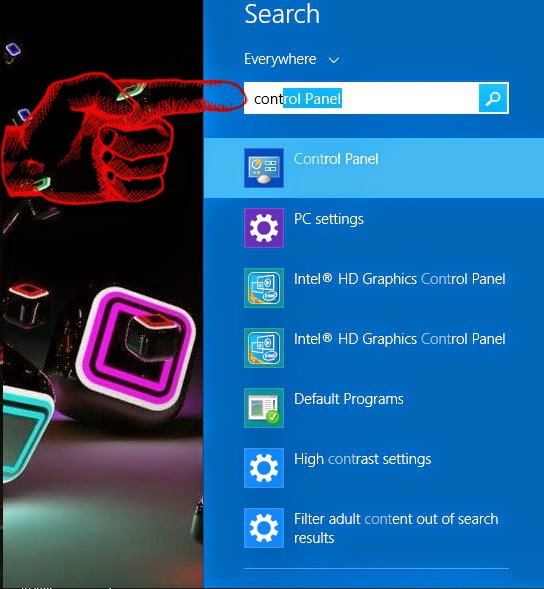
2: Go to Control panel, you can simply go to control panel by writing it on windows search.


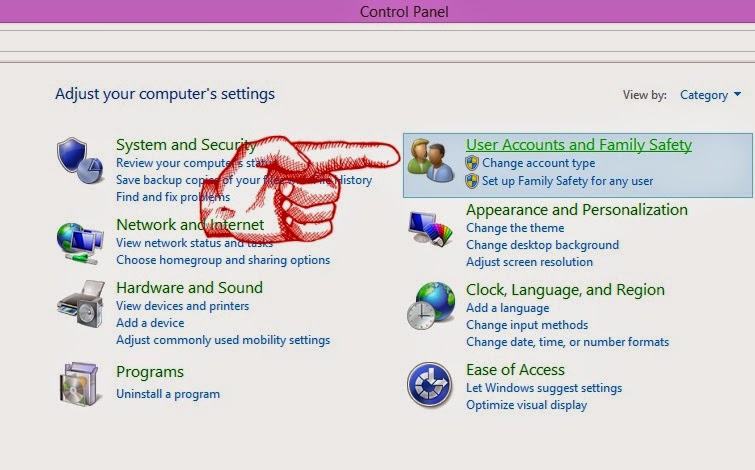
3: After opening Control Panel → Go to "Users Account and Family Safety"


4: When you open "User Account and Family Safety" then a new window will open. You have to select the first option i.e "User Account"


5: Now click on "Create Password Reset Disk" on the left side tab i.e 3rd option.


6: Now Select Next → Next → Next and again Next.


7: Now you have created your Password Rest Disk. Now Simply insert this USB in your system and Enter any password and click on Rest Password and choose this USB to rest password and simply enter the new password.
YOU HAVE DONE!

(You can also use this technique for hacking purpose, but remember that this trick is applicable only on Local account not for Microsoft account)

Feel Free to ask on our contact Forum: Contact Us

Popular Posts


© 2013 Grasp Info. All rights resevered. Designed by Graspinfo

Back To Top